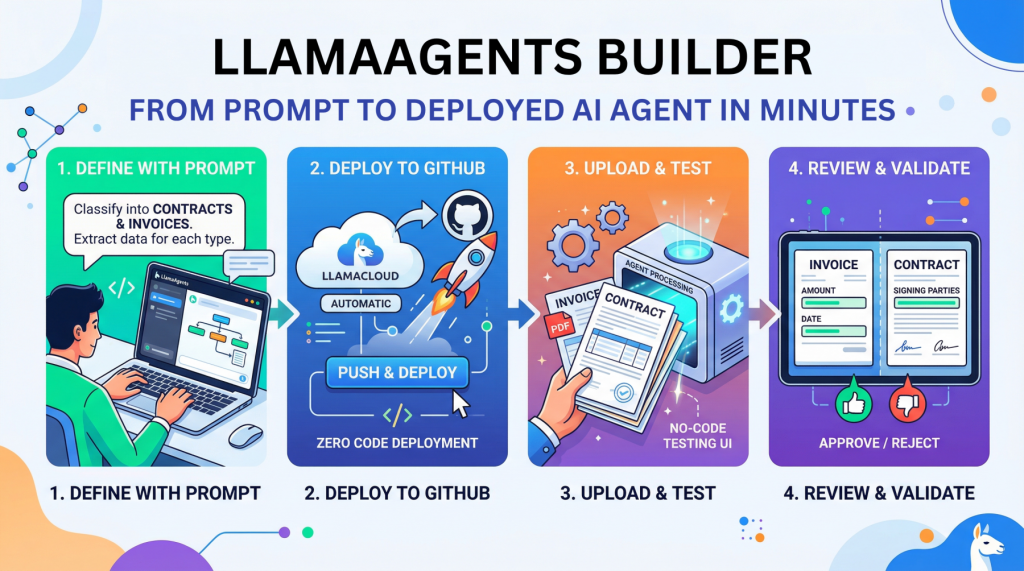
In this article, you will learn how to build, deploy, and test a no-code document-processing AI agent with LlamaAgents Builder in LlamaCloud.
Topics we will cover include:
- How to create a document-classification agent using a natural language prompt.
- How to deploy the agent to a GitHub-backed application without writing code.
- How to test the deployed agent on invoices and contracts in the LlamaCloud interface.
Let’s not waste any more time.
Introduction
Creating an AI agent for tasks like analyzing and processing documents autonomously used to require hours of near-endless configuration, code orchestration, and deployment battles. Until now.
This article unveils the process of building, deploying, and using an intelligent agent from scratch without writing a single line of code, using LlamaAgents Builder. Better still, we will host it as an app in a software repository that will be 100% owned by us.
We will complete the whole process in a matter of minutes, so time is of the essence: let’s get started.
Building with LlamaAgents Builder
LlamaAgents Builder is one of the newest features in the LlamaCloud web platform, whose flagship product was originally introduced as LlamaParse. A slightly confusing mix of names, I know! For now, just keep in mind that we will access the agents builder through this link.
The first thing you should see is a home menu like the one shown in the screenshot below. If this is not what you see, try clicking the “LlamaParse” icon in the top-left corner instead, and then you should see this — at least at the time of writing.
Notice that, in this example, we are working under a newly created free-plan account, which allows up to 10,000 pages of processing.
See the “Agents” block on the bottom-right side? That is where LlamaAgents Builder lives. Even though it is in beta at the time of writing, we can already build useful agent-based workflows, as we will see.
Once we click on it, a new screen will open with a chat interface similar to Gemini, ChatGPT, and others. You will get several suggested workflows for what you’d like your agent to do, but we will specify our own by typing the following prompt into the input box at the bottom. Just natural language, no code at all:
Create an agent that classifies documents into “Contracts” and “Invoices”. For contracts, extract the signing parties; for invoices, the total amount and date.
Simply send the prompt, and the magic will start. With a remarkable level of transparency in the reasoning process, you’ll see the steps completed and the progress made so far:
After a few minutes, the creation process will be complete. Not only can you see the full workflow diagram, which has gradually grown throughout the process, but you also receive a succinct and clear description of how to use your newly created agent. Simply amazing.
The next step is to deploy our agent so that it can be used. In the top-right corner, you may see a “Push & Deploy” button. This initiates the process of publishing your agent workflow’s software packages into a GitHub repository, so make sure you have a registered account on GitHub first. You can easily register with an existing Google or Microsoft account, for instance. Once you have the LlamaCloud platform connected to your GitHub account, it is extremely easy to push and deploy your agent: just give it a name, specify whether you want it in a private repository, and that’s it:
The process will take a few minutes, and you will see a stream of command-line-like messages appearing on the fly. Once it is finalized and your agent status appears as “Running“, you will see a few final messages similar to this:
|
1 2 3 |
[app] 10:01:08.583 info Application startup complete. (uvicorn.error) [app] 10:01:08.589 info Uvicorn running on http://0.0.0.0:8080 (Press CTRL+C to quit) (uvicorn.error) [app] 10:01:09.007 info HTTP Request: POST https://api.cloud.llamaindex.ai/api/v1/beta/agent-data/:search?project_id=
The “Uvicorn” messages indicate that our agent has been deployed and is running as a microservice API within the LlamaCloud infrastructure. If you are familiar with FastAPI endpoints, you may want to try it programmatically through the API, but in this tutorial, we will keep things simpler (we promised zero coding, didn’t we?) and try everything ourselves in LlamaCloud’s own user interface.
To do this, click the “Visit” button that appears at the top:
Now comes the most exciting part. You should have been taken to a playground page called “Review,” where you can try your agent out. Start by uploading a file, for example, a PDF document containing an invoice or a contract. If you don’t have one, just create a fictitious example document of your own using Microsoft Word, Google Docs, or a similar tool, such as this one:
As soon as the document is loaded, the agent starts working on its own, and in a matter of seconds, it will classify your document and extract the required data fields, depending on the document type. You can see this result on the right-hand-side panel in the image above: the total amount and invoice date have been correctly extracted by the agent.
How about uploading an example document containing a contract now?
As expected, the document is now classified as a contract, and on this occasion, the extracted information consists of the names of the signing parties.
Well done! As you keep running examples, make sure you approve or reject them based on whether they have been processed correctly: this helps the agent learn from feedback.
Wrapping Up
We have seen how to build and deploy, step by step and with no lines of code, an AI agent capable of classifying documents and processing them in different ways depending on the document type — all in a matter of minutes and within LlamaCloud’s newly added feature, LlamaAgents Builder.
No comments yet.
Facts Only
LlamaAgents Builder is a feature within the LlamaCloud web platform.
It allows users to create AI agents for document processing using natural language prompts.
The platform supports deploying agents to GitHub-backed applications without writing code.
A free-plan account permits processing up to 10,000 pages.
The agent creation process involves specifying tasks like classifying documents into "Contracts" and "Invoices."
The agent can extract specific data fields, such as signing parties for contracts or total amounts and dates for invoices.
Deployment involves pushing the agent workflow to a GitHub repository.
The agent runs as a microservice API within LlamaCloud's infrastructure.
Users can test the agent by uploading documents in the LlamaCloud interface.
The agent provides real-time classification and data extraction results.
Users can provide feedback to improve the agent's performance.
The process is designed to be completed in minutes without technical expertise.
Executive Summary
LlamaAgents Builder, a feature within the LlamaCloud platform, enables users to create, deploy, and test AI agents for document processing without writing code. The process involves defining an agent's task through natural language prompts, such as classifying documents into "Contracts" and "Invoices" and extracting specific data fields. Once created, the agent can be deployed to a GitHub-backed application, where it runs as a microservice API within LlamaCloud's infrastructure. Users can then test the agent by uploading documents like invoices or contracts, with the agent automatically classifying and extracting relevant information. The platform provides a user-friendly interface for feedback, allowing users to approve or reject processed documents to improve the agent's performance. This no-code approach significantly reduces the time and technical expertise required to build and deploy AI-powered document-processing workflows.
The article highlights the accessibility of this technology, emphasizing that even users with free-plan accounts can process up to 10,000 pages. The deployment process is streamlined, with the platform handling the publication of software packages to GitHub and managing the agent's runtime environment. The example provided demonstrates the agent's ability to classify documents and extract key details, such as signing parties for contracts or total amounts and dates for invoices. The process is designed to be intuitive, with clear instructions and real-time feedback, making it suitable for users without a technical background.
Full Take
This article presents a compelling case for the democratization of AI-powered document processing, showcasing how no-code platforms like LlamaAgents Builder can empower users to create and deploy intelligent agents with minimal technical barriers. The narrative is strong in its emphasis on accessibility, speed, and practical utility, particularly for tasks like document classification and data extraction. The step-by-step demonstration of building, deploying, and testing an agent without writing code is a testament to the platform's user-centric design. However, the article does not delve into potential limitations, such as the accuracy of the agent in real-world scenarios with diverse document formats or the scalability of the free-tier offering. The focus on ease of use and rapid deployment could inadvertently downplay the complexities of AI training and validation, which are critical for reliable performance.
The pattern here aligns with a broader trend in tech marketing: the promise of "no-code" solutions as a panacea for automation challenges. While the platform undoubtedly lowers the entry barrier, the article could benefit from acknowledging the trade-offs, such as the need for ongoing feedback to refine the agent's performance or the potential for misclassification in edge cases. The narrative also assumes a level of trust in the platform's underlying AI models, which may not be warranted without transparency about their training data or bias mitigation strategies.
Root cause: The paradigm driving this narrative is the push for AI democratization, where complex tools are abstracted into user-friendly interfaces to accelerate adoption. The unstated assumption is that reducing technical friction will inherently lead to better outcomes, but this overlooks the importance of user education and the nuances of AI behavior.
Implications: For human agency, this technology could empower non-technical users to automate repetitive tasks, freeing up time for higher-value work. However, the cost may be a reliance on black-box systems where users lack visibility into how decisions are made. Second-order consequences could include the proliferation of poorly trained agents if users do not provide sufficient feedback or the centralization of document processing within a single platform, raising data privacy concerns.
Bridge questions: How might the accuracy of these no-code agents compare to custom-built solutions in high-stakes environments? What safeguards are in place to prevent misclassification or data extraction errors? How does the platform address biases in document processing, particularly for non-standard or multilingual documents?
Counterstrike scan: If this were part of a coordinated influence campaign, the playbook might involve exaggerating the ease and reliability of no-code AI to drive platform adoption, while downplaying the need for oversight or validation. The actual content does not match this pattern, as it provides a transparent walkthrough of the process and acknowledges the role of user feedback in improving the agent. The focus remains on practical utility rather than overpromising capabilities.
Sentinel — Human
This article appears to be human-written with a focus on explaining the process of building an AI agent without writing code using LlamaAgents Builder.